Binary Search in C — Finding Needles in Haystacks
Imagine you’re looking for a word in a dictionary. Do you start at page 1 and flip through every page? Of course not! You open somewhere in the middle, decide if your word is before or after, and repeat. That’s exactly how binary search works.
Why Binary Search?
If you have a sorted array of 1 million numbers, a sequential search (checking one by one) could take up to 1 million steps. Binary search? Just 20 steps. That’s the power of $O(\log n)$ time complexity.
The Intuition
- Find the midpoint of the array
- Is the target at the midpoint? Done!
- Is the target smaller? Search the left half
- Is the target larger? Search the right half
- Repeat until found (or the range is empty)

Image: Binary search repeatedly halves the search space. Wikipedia
The Math Behind It
If you halve $n$ repeatedly, how many times until you reach 1?
\[\log_2(n) = \text{number of halvings}\]For $n = 1,000,000$: \(\log_2(1,000,000) \approx 19.93\)
So binary search needs at most 20 comparisons for a million elements!
The Algorithm
Given a sorted array $X$ with $n$ elements and a target value $T$:
- Set $S = 0$ (start index)
- Set $E = n - 1$ (end index)
- While $E \ge S$:
- $m = S + \frac{E - S}{2}$ (avoid overflow with this formula!)
- If $X_m = T$: return $m$ (found!)
- If $X_m > T$: set $E = m - 1$ (search left)
- If $X_m < T$: set $S = m + 1$ (search right)
- Return $-1$ (not found)

Visual Walkthrough
Let’s trace the algorithm searching for 21 in this array:
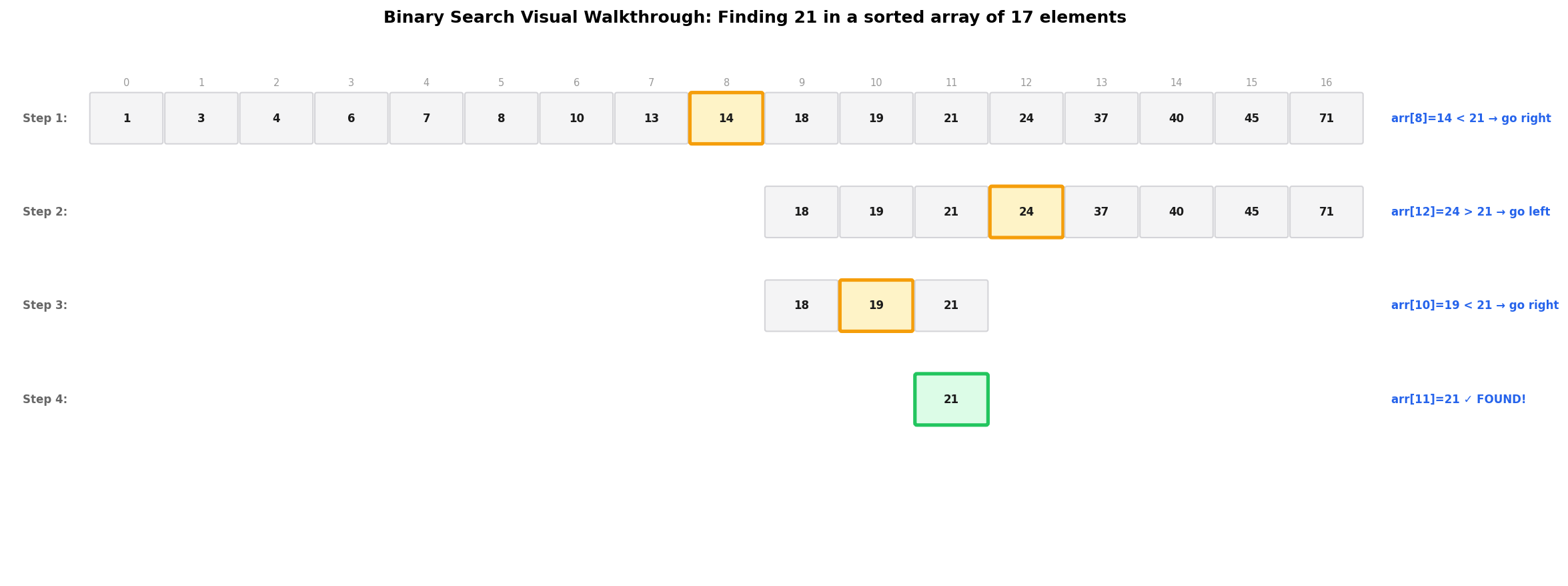
Each step eliminates half the remaining elements. Yellow = midpoint checked, Green = target found.
Here is the same trace in table form:
| Step | start |
end |
mid |
arr[mid] |
Comparison | Action |
|---|---|---|---|---|---|---|
| 1 | 0 | 16 | 8 | 14 | 14 < 21 | Search right: start = 9 |
| 2 | 9 | 16 | 12 | 24 | 24 > 21 | Search left: end = 11 |
| 3 | 9 | 11 | 10 | 19 | 19 < 21 | Search right: start = 11 |
| 4 | 11 | 11 | 11 | 21 | 21 == 21 | Found at index 11! |
Only 4 comparisons to find the target in 17 elements. A linear search would have taken 12 comparisons.
Why This Works
Binary search relies on a powerful invariant: if the array is sorted, every element left of mid is smaller, and every element right of mid is larger.
This lets us safely discard half the search space after each comparison. The key insight is that we never “lose” the target — we only eliminate regions where the target cannot exist.
The overflow-safe midpoint formula start + (end - start) / 2 is critical. The naive (start + end) / 2 can overflow when start and end are large integers near INT_MAX.
The C Code
Here is the iterative implementation — the version you should use in production:
#include <stdio.h>
// Binary search function
// Returns the index of target if found, -1 otherwise
int binary_search(int arr[], int start, int end, int target);
int main() {
// A sorted array (binary search REQUIRES sorted data!)
int arr[] = {1, 3, 4, 6, 7, 8, 10, 13, 14, 18, 19, 21, 24, 37, 40, 45, 71};
int n = sizeof(arr) / sizeof(arr[0]);
int target;
printf("Enter a number to search: ");
scanf("%d", &target);
// Search!
int index = binary_search(arr, 0, n - 1, target);
if (index == -1) {
printf("❌ %d was not found in the array.\n", target);
} else {
printf("✅ %d found at index %d!\n", target, index);
}
return 0;
}
int binary_search(int arr[], int start, int end, int target) {
// Keep searching while the range is valid
while (start <= end) {
// Calculate midpoint (this formula prevents integer overflow!)
int mid = start + (end - start) / 2;
// Check if target is at midpoint
if (arr[mid] == target) {
return mid; // Found it!
}
// If target is smaller, search left half
if (arr[mid] > target) {
end = mid - 1;
}
// If target is larger, search right half
else {
start = mid + 1;
}
}
// Target not found
return -1;
}
Expected Output
Enter a number to search: 21 ✅ 21 found at index 11! Enter a number to search: 99 ❌ 99 was not found in the array.
Recursive Version
Binary search is a classic divide and conquer problem. Here’s the recursive version:
#include <stdio.h>

int binary_search_recursive(int arr[], int start, int end, int target) {
    // Base case: target not found
    if (start > end) {
        return -1;
    }

    int mid = start + (end - start) / 2;

    // Base case: found the target!
    if (arr[mid] == target) {
        return mid;
    }

    // Divide and conquer: search the appropriate half
    if (arr[mid] > target) {
        return binary_search_recursive(arr, start, mid - 1, target);
    } else {
        return binary_search_recursive(arr, mid + 1, end, target);
    }
}

int main() {
    int arr[] = {2, 5, 8, 12, 16, 23, 38, 45, 56, 67, 78};
    int n = sizeof(arr) / sizeof(arr[0]);
    int target = 23;

    int result = binary_search_recursive(arr, 0, n - 1, target);

    if (result != -1) {
        printf("Element found at index %d\n", result);
    } else {
        printf("Element not found\n");
    }

    return 0;
}
Iterative vs Recursive
| Approach | Time | Space | Pros | Cons |
|---|---|---|---|---|
| Iterative | $O(\log n)$ | $O(1)$ | No stack overflow risk, faster, constant memory | Slightly more code to read |
| Recursive | $O(\log n)$ | $O(\log n)$ | Clean, elegant, matches math definition | Risk of stack overflow on huge arrays |
For production code, use the iterative version. For learning and interviews, both are valuable.
Time Complexity Comparison
| Algorithm | Best Case | Average Case | Worst Case | Space | Requires Sorted? |
|---|---|---|---|---|---|
| Linear Search | $O(1)$ | $O(n)$ | $O(n)$ | $O(1)$ | No |
| Binary Search | $O(1)$ | $O(\log n)$ | $O(\log n)$ | $O(1)$ | Yes |
Common Pitfalls
- Integer overflow: Use
mid = start + (end - start) / 2NOT(start + end) / 2. Whenstartandendare both nearINT_MAX, their sum overflows. - Off-by-one errors: Be careful with
mid - 1vsmid. If you setend = midinstead ofend = mid - 1, you can get an infinite loop. - Unsorted input: Binary search only works on sorted data! Running it on unsorted data gives unpredictable (and wrong) results.
- Infinite loops: Make sure
startorendchanges every iteration. If neither changes, the loop never exits.
Real-World Uses
- Database indexing: Finding records in B-trees and B+ trees — the backbone of MySQL, PostgreSQL, and MongoDB
- Git bisect: Finding which commit introduced a bug by binary searching through commit history
- Auto-complete: Finding prefix matches in sorted dictionaries and search suggestions
- Version control: Finding the first bad version in a release history (LeetCode classic)
- Graphics: Ray tracing acceleration structures use spatial binary search (BVH trees)
- Compilers: Symbol table lookups in sorted identifier lists
Try It Yourself
- Missing element: What happens if you search for a number not in the array? Trace through the algorithm manually with
target = 100. - First occurrence: Modify the code to find the first occurrence of a duplicate value. (Hint: when
arr[mid] == target, don’t return immediately — keep searching left.) - Square root: Implement binary search to find the integer square root of a number. Search for $x$ where $x^2 \le n < (x+1)^2$.
- Performance test: Compare the speed of linear search vs binary search on an array of 10 million elements. Time both with
clock(). - Rotated array: What if the sorted array was rotated at some pivot? Can you still use binary search? (LeetCode #33)